

To optimize a travel website for SEO, you need to match pages to traveller searches, fix technical problems, publish useful content, and build trust. These actions help search engines find your offers and help visitors choose the right trip.
Your goal should extend beyond more traffic. A successful travel SEO strategy attracts people who can book your tours, request a quote, or reserve a room.
This guide explains how to optimize a travel website for SEO through 20 practical steps.
Key takeaways
- Focus on bookings and qualified leads. Prioritize offers with available capacity and track enquiries, reservations, and sales.
- Match content to search intent. Use full-funnel keyword research to create suitable pages for trip planning, comparisons, and booking searches.
- Give each page a clear purpose. Map keyword groups to URLs, improve navigation, and merge pages that substantially overlap.
- Answer questions that influence bookings. Explain prices, inclusions, meeting points, cancellation terms, and accessibility. Add verified details from your team.
- Fix technical barriers. Check indexing, mobile speed, booking widgets, duplicate URLs, and internal links.
- Build trust through local SEO and link-building. Maintain accurate business listings, collect genuine reviews, and earn links from relevant travel sources.
- Support AI search visibility and measure results. Publish clear, accurate answers, then review which pages generate qualified enquiries and confirmed bookings.
Table of Contents
20 Steps to Optimize Your Travel Website:
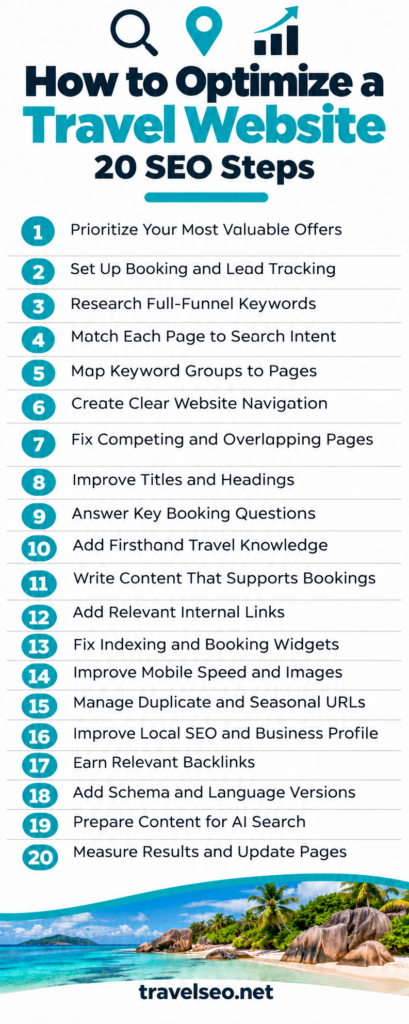
1. Choose the Offers You Want SEO to Sell
Start with your business priorities.
Select three to five tours, destinations, accommodation types, or travel services that deserve more bookings. Choose offers that have available capacity, clear customer demand, and enough profit to support your marketing costs.
For each offer, record:
- Current organic visits.
- Enquiries or bookings.
- Average booking value.
- Available dates.
- Main customer type.
For example, a sailing company could focus on private sunset cruises before publishing another broad island guide.
Your first action: Create a priority list of five pages that could generate meaningful sales.
2. Set Up Tracking Before You Change Pages
Connect Google Search Console and your analytics platform. Confirm that both collect data correctly.
Search Console helps you review search visibility. Analytics helps you follow visitor actions.
Track actions that show commercial value:
- Completed bookings.
- Submitted enquiry forms.
- Quote requests.
- Booking starts.
- Phone and messaging clicks.
Keep clicks separate from confirmed leads. A WhatsApp button click does not prove that someone started a conversation.
If customers complete payment on another domain, check whether your booking provider supports cross-domain measurement.
Your first action: Complete a test enquiry and booking. Confirm that each action appears once in your reports.
3. Research Keywords Across the Full Booking Journey
Travellers search for different information as they move from inspiration to booking. Your keyword research should cover each stage.
Search stage | Example keyword | Suitable page |
Inspiration | Where to go in Portugal with children | Destination guide |
Planning | Best month for a Douro Valley trip | Practical article |
Comparison | Private vs shared Douro wine tour | Comparison guide |
Booking | Private Douro wine tour from Porto | Tour page |
Preparation | What to bring on a Douro wine tour | Customer guide |
Use Google Keyword Planner to check estimated search demand in your target markets. Its search estimates depend on your location, date range, and network settings. Its competition metric measures advertiser competition, rather than organic ranking difficulty. Google Ads Help
Your first action: Build a shortlist of 30 relevant keywords and label each one by search intent.
4. Check Search Intent Before You Create Content
Search intent describes what someone wants to achieve.
A person searching “how to choose a safari lodge” needs advice. A person searching “book private Kenya safari” needs a service page.
Kleesto highlights the importance of matching travel content to informational, navigational, and transactional searches. Apply that distinction before choosing a page format.
Search your target phrase and examine the results:
- Do tour pages dominate?
- Do comparison articles appear?
- Do local businesses appear in Maps?
- Do results answer a practical question?
Use these patterns to guide your page.
Your first action: Check the results for your ten most valuable keywords before assigning content.
5. Map Each Keyword Group to a Page
Create a content map that connects related searches to a suitable URL.
Include the keyword group, search intent, page type, existing URL, and required action.
Keyword group | Page type | Action |
Private Porto walking tours | Service page | Improve existing page |
Porto walking tour prices | Service-page section | Add pricing explanation |
Porto walking routes | Planning guide | Create useful article |
Private vs group walking tours | Comparison guide | Create comparison |
Several related phrases can belong on one page. Small wording differences rarely justify separate articles.
Your first action: Check your existing pages before commissioning new content.
6. Organize Your Website Around How Customers Browse
Choose clear categories that reflect your business.
A multi-destination agency might organize pages by country and city. A specialist operator might organize tours by activity and departure location.
Visitors should understand where to go next without guessing.
Google’s SEO Starter Guide recommends logical organization and descriptive URLs that help people understand pages.
Use clear navigation labels such as “Italy Tours,” “Family Holidays,” and “Private Transfers.”
Avoid changing successful URLs solely to make them look cleaner.
Your first action: Ask someone unfamiliar with your website to find and enquire about one offer. Record where they hesitate.
7. Find Pages That Compete for the Same Search
Travel websites often accumulate overlapping destination pages and guides.
In Search Console:
- Select an important query.
- Open the Pages tab.
- Review the URLs receiving impressions.
- Check whether those pages serve different needs.
Two ranking pages do not automatically indicate a problem. Investigate when similar pages alternate positions or send visitors to the wrong offer.
Your first action: Review five valuable queries. Merge pages only when their purposes and content substantially overlap.
8. Write Titles and Headings That Explain the Offer
A title should identify the page’s main subject and give readers a reason to visit.
For example:
Private Douro Valley Wine Tour from Porto | Lunch Included
This title identifies the experience, departure city, and a useful inclusion.
Use a clear main heading and descriptive subheadings. Write a meta description that explains the page’s value without making claims the offer cannot support.
Place your main keyword naturally in the title, heading, and relevant body text.
Your first action: Rewrite unclear titles on your five priority pages.
9. Answer Booking Questions on Product Pages
A visitor should understand the offer before opening the booking calendar.
Include:
- Price and whether it applies per person or group.
- Duration and departure time.
- Meeting point or pickup arrangements.
- Inclusions and exclusions.
- Group size.
- Cancellation terms.
- Accessibility details.
Explain limitations honestly. For example, describe stairs, uneven ground, or luggage restrictions when they affect the trip.
Your first action: Ask your sales team which questions customers repeat. Add the answers to the relevant pages.
10. Add Details That Prove Your Travel Experience
Replace vague descriptions with information your team can verify.
Instead of “Enjoy an unforgettable local experience,” explain what visitors do, how the route works, and who leads it.
Ask guides and advisors for details such as:
- Where queues usually form.
- Which stops provide shade.
- What changes during wet weather.
- Which route suits families.
- Where guests can use toilets.
Google’s helpful content guidance encourages clear evidence of experience and useful answers for the intended audience.
Your first action: Interview one guide for 20 minutes and improve one tour page with verified observations.
11. Publish Articles That Support a Booking Decision
Choose subjects that connect to your offers.
A cycling operator could publish:
- How to choose between guided and self-guided cycling.
- What fitness level a specific route requires.
- What a cycling holiday price includes.
- Which luggage transfer option suits a family.
Each article should solve a real problem and link to a relevant next step.
Give readers enough information to make a decision. Explain who should choose another option when your offer does not fit.
Your first action: Turn five recent customer questions into article briefs.
12. Build Useful Internal Links
Internal links connect planning content with services.
For example, an article about visiting Lisbon with children could link to a family walking tour where that experience helps readers follow the advice.
Use descriptive link text such as “private Lisbon family walking tour.”
Check that:
- Important offers receive links from relevant guides.
- Destination pages help visitors compare available experiences.
- Articles link to supporting information.
- Broken links receive attention.
Google also identifies internal links as a way to make content easier to find for its AI search features. developers.google.com
Your first action: Add relevant booking-page links to your five most visited planning articles.
13. Fix Indexing and Booking Widget Problems
Open your main pages in Search Console’s URL Inspection tool. Check Google’s indexed version and run a live test when needed.
Investigate accidental noindex instructions, blocked resources, errors, and missing content.
Check that your descriptions, key facts, and links remain accessible when the calendar loads slowly.
Your first action: Inspect one destination page, one article, and one booking page. Give your developer specific examples of missing content.
14. Improve Mobile Speed and Image Delivery
Test your busiest page types on mobile.
Use Core Web Vitals to assess loading, responsiveness, and layout stability. Current good-experience thresholds are:
Metric | Target |
Largest Contentful Paint | 2.5 seconds or less |
Interaction to Next Paint | 200 milliseconds or less |
Cumulative Layout Shift | 0.1 or less |
Assess these thresholds at the 75th percentile, separately for mobile and desktop visitors. web.dev
Resize oversized photos, compress images, reserve space for embedded calendars, and remove unnecessary scripts.
Your first action: Fix the largest loading problem on your highest-value mobile landing page.
15. Control Duplicate, Filtered, and Seasonal URLs
Date pickers, sorting options, and currency selectors can create multiple URLs with similar content.
Decide which versions deserve search visibility.
Use canonical tags for genuinely duplicate or near-duplicate pages. Google treats canonical annotations as signals when choosing a preferred version. They do not guarantee its selection. developers.google.com
For seasonal trips, keep useful recurring pages available and update their availability. Redirect permanently removed offers only when a relevant replacement exists.
Your first action: Review ten URLs generated by your filters or calendars and document how each should behave.
16. Improve Local SEO and Google Business Profile
Local SEO helps eligible businesses appear when travellers search for nearby services.
If your business qualifies for Google Business Profile, maintain accurate categories, contact details, hours, photos, and website links. Online-only businesses should check eligibility before creating a profile.
Google explains that local results depend mainly on relevance, distance, and prominence. Complete business information and genuine reviews can support local visibility. Google Business Profile Help
Your website should also explain where you operate and where customers meet you. Distinguish your office address from tour departure points.
Your first action: Compare your website, profile, and major listings. Correct conflicting details.
17. Build Authority Through Relevant Link-Building
Off-page SEO includes link-building and credible external coverage.
Create resources that another organization would reasonably recommend:
- A verified accessible-tour route.
- A local transport comparison.
- A downloadable walking map.
- A practical guide to visiting a lesser-known attraction.
Contact relevant tourism organizations, accommodation partners, and publishers. Explain which readers the resource helps.
Avoid buying links that pass ranking credit. Google’s spam policies also address excessive exchanges and require appropriate qualification for paid placements. developers.google.com
Your first action: Create one useful resource and identify ten relevant organizations that might reference it.
18. Add Accurate Structured Data and Language Versions
Use structured data that matches the page’s visible information.
Possible starting points include organization details, articles, and breadcrumbs. Check Google’s structured data documentation before expecting a particular search feature. Markup does not guarantee an enhanced result. developers.google.com
If you serve several language markets, publish complete translated pages with working navigation and booking information.
Use hreflang annotations to identify equivalent language or regional versions. developers.google.com
Your first action: Validate one page template and review one translated booking journey from start to finish.
19. Make Your Content Useful for AI Search
Write clear answers to specific travel questions. Include facts that readers can verify, such as departure locations, trip durations, restrictions, and price conditions.
Support those facts with consistent business information and credible external references.
Google’s AI search guidance states that supporting pages must be indexed and eligible for a search snippet. It requires no special AI schema or additional technical setup. Inclusion remains uncertain. developers.google.com
Treat clear answers and accurate facts as reader benefits. Avoid promising that a particular layout will earn AI citations.
Your first action: Improve five important question-and-answer sections with direct answers and verified details.
20. Review Results and Update the Pages That Matter
Review SEO performance monthly and make decisions at page level.
Finding | Next check |
Impressions rise but clicks stay flat | Search intent, title, and competing results |
Visits rise but enquiries stay flat | Offer clarity, customer fit, and booking process |
Enquiries rise but sales stay flat | Availability, pricing, and sales follow-up |
A seasonal page loses traffic | Booking timing and year-over-year demand |
Assign someone to check prices, pickup details, opening times, and availability before each important booking period.
For a simple hypothetical calculation, 20 qualified enquiries from 1,000 organic visits produce a 2% enquiry rate. Track confirmed bookings separately.
Your first action: Create a monthly report that connects organic landing pages with qualified enquiries and sales.
Frequently Asked Questions
Can a small travel website compete with large booking platforms?
Lorem ipsum dolor sit amet, consectetur adipiscing elit. Ut elit tellus, luctus nec ullamcorper mattis, pulvinar dapibus leo.
Should I copy tour descriptions from my suppliers?
Write your own descriptions and verify the details with your suppliers. Explain who each trip suits, how pickup works, and which costs customers should expect. Supplier text can provide a factual starting point, but your page should help customers understand why they should book through your business.
Should I remove my tours from booking platforms to improve SEO?
You do not need to leave booking platforms to improve your website’s SEO. These platforms can introduce customers to your business while your website develops its own search visibility. Compare commissions, customer acquisition costs, and booking profit before changing your distribution strategy.
Should I change my domain name to include travel keywords?
A domain change is rarely a useful first step for an established website. It requires a migration and can disrupt search visibility if the move has technical errors. Keep a recognizable domain unless you have a clear business reason to change it, such as a rebrand.
Should my travel website display prices if every trip requires a custom quote?
Provide realistic starting prices, example budgets, or price ranges when you can keep them accurate. Explain the assumptions, such as travel dates, group size, accommodation level, and included services. This information helps visitors assess affordability before requesting a quote and helps your team receive more suitable enquiries.
Put Your Travel SEO Plan Into Action
Start with your five most valuable pages and fix the problems that stop customers from finding, understanding, or booking your offers. Build content around real travel decisions, then support it with reliable technical performance and relevant links. Review results each month and refresh details before customers begin planning their trips. A useful travel website gives each visitor a clear answer and a clear next step
